
Download Artroom – AI Art Creation Tool for Windows
Introduction & Overview
Artroom AI is a locally‑installed graphical user interface (GUI) application that brings the power of Stable Diffusion to anyone who wants to create stunning AI‑generated artwork without writing a single line of code. Designed exclusively for Windows, the program packs a compact 200 MB installer and launches a clean, intuitive workspace where users can experiment with prompts, adjust generation settings, and instantly see results. Whether you are a hobbyist looking to dabble in digital painting, a content creator needing quick visuals for social media, or a professional artist exploring new styles, Artroom AI removes the technical barriers that traditionally accompany AI art tools.
The software also includes a built‑in blog that curates the latest trends, tutorials, and community showcases, plus a secure checkout system that lets you sell or purchase finished pieces directly from the platform. While the Windows‑only focus limits cross‑platform reach, the seamless installation process, responsive UI, and integrated resources make Artroom AI a compelling entry point for anyone interested in modern AI‑driven creativity. In addition, the free download provides full functionality out‑of‑the‑box, with optional premium assets available for purchase, ensuring that users of all skill levels can start creating immediately without hidden fees.
Features, Compatibility & Installation
Core Feature Set
- One‑click Stable Diffusion integration – no command‑line setup required.
- Drag‑and‑drop prompt editor with real‑time preview of generated images.
- Preset style libraries (anime, photorealistic, abstract, etc.) to jump‑start creativity.
- Advanced parameter controls (CFG scale, sampling steps, seed management) for fine‑tuning output.
- Built‑in gallery that auto‑saves generated artwork and allows easy export in PNG/JPEG formats.
- In‑app blog delivering daily news, tutorials, and community spotlights on AI art.
- Secure checkout and digital marketplace for buying and selling AI‑generated pieces.
- Resource download center offering model updates, custom LoRA files, and texture packs.
- Lightweight installer (≈200 MB) and automatic updates via a secure server.
- Comprehensive help center with video guides, FAQs, and community forums.
System Requirements & Compatibility
Artroom AI is built for Windows 10 and Windows 11 (64‑bit). The installer checks system requirements during setup, ensuring that your PC meets the minimum GPU (NVIDIA RTX 2060 or higher recommended) and RAM (8 GB) thresholds for optimal performance. While the application runs on any modern Intel or AMD CPU, a dedicated GPU dramatically reduces image‑generation latency and improves overall stability. Users with lower‑end hardware can still run the software, but generation times may increase and some advanced options (such as high‑resolution outputs) may be limited. The program does not require an internet connection for core image generation; connectivity is only needed for updates, blog access, and marketplace transactions.
Step‑by‑Step Installation & First Run
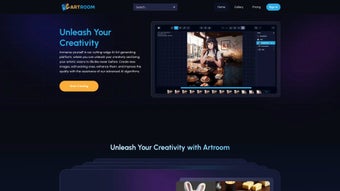
Installing Artroom AI is straightforward. After downloading the ArtroomSetup.exe file from the official website, double‑click to launch the wizard. The installer validates your operating system, prompts you to choose an installation directory (the default C:\Program Files\Artroom is recommended), and automatically extracts the Stable Diffusion model files. Within five minutes, the program is ready to run, and you’ll be greeted by a clean dashboard divided into three primary panels: Prompt Input, Settings, and Preview.
The first‑time launch also runs a brief hardware check, confirming that your GPU drivers are up‑to‑date and that sufficient VRAM is available. If any issues are detected, the installer offers direct links to the appropriate driver updates. After the check, the main interface appears, and you can start creating by typing a descriptive prompt—such as “a futuristic cityscape at sunset, cyberpunk style”—into the text box. Sliders beneath the prompt let you adjust the CFG (Classifier‑Free Guidance) scale, sampling steps, and image dimensions. Selecting a preset style auto‑populates the prompt and parameters, giving you instant results with minimal effort.
Pros, Cons & Frequently Asked Questions
Pros
- Intuitive, code‑free interface ideal for beginners.
- Full integration of Stable Diffusion with real‑time preview.
- Rich library of preset styles and advanced controls for power users.
- Secure in‑app marketplace and checkout for monetising artwork.
- Lightweight installer and automatic updates keep the app current.
Cons
- Windows‑only support excludes macOS, Linux, and mobile users.
- Requires a relatively modern GPU for optimal performance.
- Advanced features may still have a learning curve for absolute novices.
- No cloud rendering option; all processing is local.
FAQ
Do I need an internet connection to use Artroom AI?
Artroom AI runs entirely on your local machine, so an internet connection is only required for downloading updates, accessing the blog, or using the marketplace. All image generation happens offline.
Can I use my own Stable Diffusion model with Artroom?
Yes. The Advanced Settings tab includes an option to load custom model checkpoints and LoRA weights, allowing you to tailor the generation engine to your specific artistic preferences.
Is there a free version of Artroom AI?
Artroom AI is offered as a free download with full functionality. Optional premium assets (exclusive style packs, higher‑resolution exports) can be purchased through the in‑app store.
What hardware specifications do I need?
A Windows 10/11 PC with at least 8 GB RAM and a modern GPU (NVIDIA RTX 2060 or better) is recommended for smooth operation. The software will still run on lower‑end hardware but generation times may increase.
How secure is the checkout process for buying artwork?
The checkout uses SSL encryption and integrates with reputable payment gateways, ensuring that your financial information is protected during transactions.
Conclusion & Call to Action
Artroom AI stands out as a user‑friendly gateway to the world of AI‑generated art, delivering the full power of Stable Diffusion behind a polished Windows interface. Its blend of beginner‑oriented simplicity and advanced customisation options makes it a versatile tool for creators of all skill levels. While the platform’s Windows‑only limitation and hardware demands may deter some, the free download, regular updates, and built‑in marketplace provide ample value for anyone eager to explore AI as a creative partner. If you’re ready to turn imaginative prompts into vibrant visual pieces without wrestling with code or complex installations, Artroom AI offers a seamless, secure, and feature‑rich solution.
Download Artroom now and start generating your own AI masterpieces instantly. Join the community, stay informed via the in‑app blog, and perhaps even monetise your creations through the secure checkout. Your next digital canvas is just a click away.



.png)



